Help
Frequently asked questions
Answers about buying, downloading and printing BinderArt pages: what you get, which binders fit, refunds, licences and more.
Getting started
What is BinderArt?
BinderArt sells ready-made binder pages. Each one takes a single trading card's artwork and continues it across every pocket of a nine-pocket binder page. You buy the print file, print it at exact card size, cut along the guides, and slide the pieces into the pockets around your real card. The card stays a card; the page around it becomes the rest of the scene.
It is the DIY "full art binder" trend without the hours in Photoshop. See how it works.
Which cards do you make pages for?
Full-art cards from the Pokémon TCG: Illustration Rares and Special Illustration Rares, mostly from the Scarlet & Violet and Mega Evolution eras. Their artwork already runs to the edges and has a scene worth continuing.
Browse by set or search for a card. If yours is not in the shop yet, request it and we will email you when its page is ready. Popular requests are made first.
Which card games are supported?
Pokémon today. The layout maths is game-agnostic, because every major TCG uses the same 63.5 x 88.9 mm card, so Magic: The Gathering, One Piece, Lorcana and others are on the roadmap. Sign up in the footer to hear when they land.
Do I need to own the card?
Yes, that is the point. Every page is built with the centre pocket left for your real card to slide into. Without the card the page has a hole in the middle of the scene, and our terms ask that you own the card a page is built around.
How much does it cost?
EUR 4.99 per page, VAT included. That buys the print file for a nine-pocket A4 page and a personal licence to print it as often as you like. There are no subscriptions and nothing to ship.
Can I see the page before I buy?
Yes, all of it. Every product page shows the finished artwork laid into a binder page with the card in its pocket, and you can switch to the full print sheet. What you see is the file you receive, minus the watermark.
About the pages
How is the artwork made?
Each page starts from the card's own artwork. An image model continues the scene beyond the card's edges, in the illustrator's style, at page size. A person then checks the result against the card, repaints anything that went wrong, and approves it before it goes on sale. The card's own artwork is never repainted.
Which binder sizes do the pages fit?
Every page is laid out for the standard nine-pocket (3 x 3) binder page, with the card in the centre pocket. Four- and six-pocket layouts are not offered yet; they are on the list once the nine-pocket range is where we want it.
Can I choose which pocket my card sits in?
Not on a ready-made page: the artwork was composed around the centre pocket, so that is where the card belongs. If your card lives elsewhere in your binder, give it the middle pocket of this page; the eight pieces around it are made for exactly that arrangement.
Why does the expanded art look different from the card?
The card's own artwork is kept where it is, at full fidelity. Everything around it is new: the model has to imagine what lies beyond the card's edges, and it does so in the illustrator's style rather than by copying. Think of it as a set painter finishing the backdrop, not a photocopier.
What about 12-pocket pages?
Not yet. A 3 x 4 page is taller than A4 or Letter, so it needs tiled multi-page printing with registration marks. It is on the list.
My card is not in the shop. Can I request it?
Yes. Use the request form on the home page: tell us the card and your email address, and we will email you when its page is ready. Requests decide what gets made next, so the more people ask for a card, the sooner it appears.
Printing and cutting
What paper should I use?
Matte or satin photo paper between 200 and 250 gsm is the sweet spot: it takes ink well, stays flat in a pocket and does not glare next to a real card. Good matte cardstock works too. Avoid glossy paper, which shows every fingerprint and fights with the card's own finish. More in the printing guide.
What printer settings do I need?
Print at 100% or "actual size". Turn off any fit-to-page, shrink-to-fit or scaling option. Set the paper size to A4. Choose the paper type you loaded so the printer uses the right amount of ink. Everything else is taste.
Do I need a borderless printer?
It helps, because the file is built full-bleed to the paper. Without borderless printing the outer pockets lose a few millimetres to the printer's margin. The pieces themselves are still cut at exact card size, so they still fit; you just lose a sliver of scene at the outside edges.
How do I cut the pieces?
A metal ruler and a sharp craft knife on a cutting mat give the cleanest results. A guillotine trimmer is faster if you have one. Print the PDF double-sided so the cutting guide sits on the back of the sheet, turn the sheet over and cut along its lines. Change the blade often; a dull blade tears photo paper. The printing guide walks through it step by step.
What is the cutting guide sheet?
The second page of your print file: the cut lines and piece numbers for your page, laid out for the back of the sheet. Print the PDF double-sided, flipped on the long edge, and you can cut from the back with no marks on the art. If you print the art on its own, the free nine-pocket guide does the same job on a separate sheet.
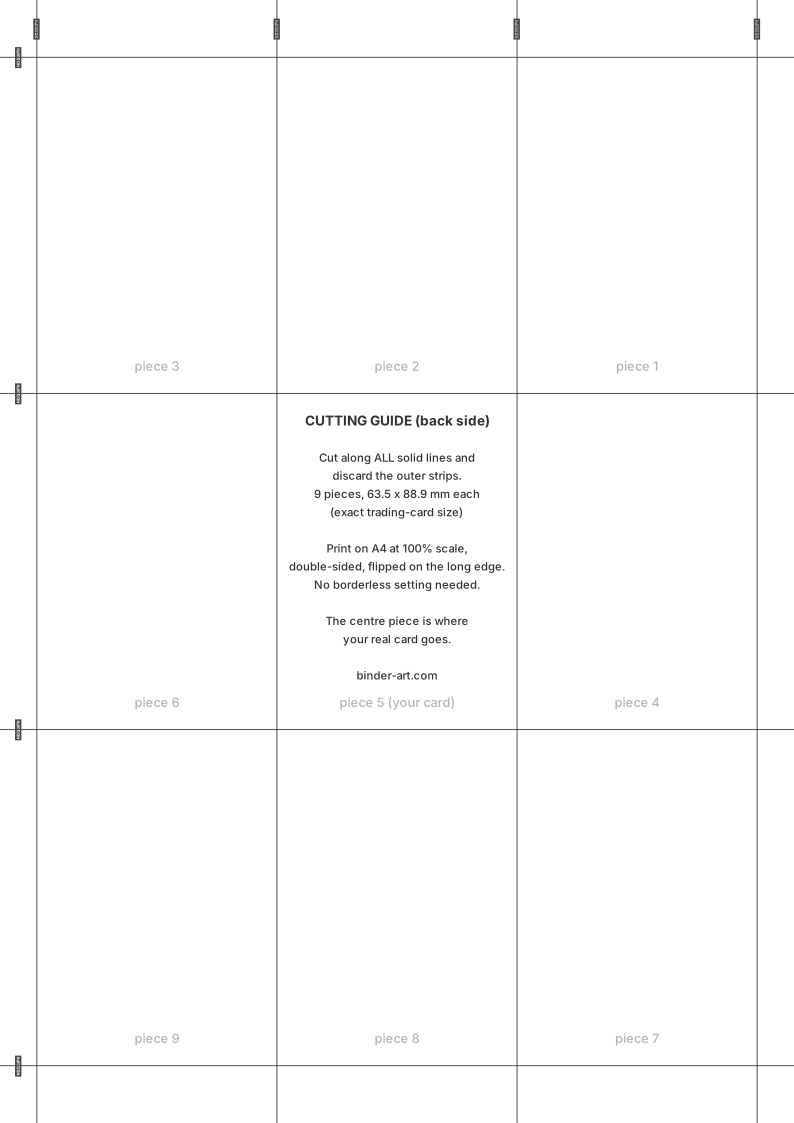
My pieces do not line up with the pockets.
Nine times out of ten the print was scaled. Measure a cut piece: it should be exactly 63.5 x 88.9 mm, the same as a card. If it is smaller, a fit-to-page setting was on. If the pieces are the right size but the scene looks shifted, check that your binder page really has nine pockets in three rows of three. The troubleshooting table in the printing guide covers the rest.
Can I take the file to a print shop?
Yes. Ask for the PDF printed double-sided at 100% on A4, flipped on the long edge, on matte photo paper; borderless is not needed because the cut lines are on the back. Most shops can also cut to size along the guide. Your licence covers having your own copy printed for you; it does not cover the shop reselling it.
Should I sleeve the pieces?
Only if the pocket is roomy. Binder pockets are cut for a single card, and photo paper is already thicker than a card. Unsleeved pieces sit flattest. If you want protection, use thin perfect-fit sleeves and print on lighter paper.
Orders and files
What exactly do I get when I buy?
One print-ready PDF with two pages: the full A4 sheet laid out as a nine-pocket page with the centre pocket for your card, and the cutting guide for the back of that same sheet. With it comes a personal licence to print it as often as you like.
Where is my file?
Your order confirmation email has a download button for each page. The files also live in your account, under Orders and downloads: sign in with the email address you used at checkout, you get a one-time code by email, no password to remember, and download each page from the order.
Can I download it again later?
Yes. The file stays attached to your order for as long as the order exists. Sign in, open the order, download again. If a download ever fails, contact us with the order number and we will send the file by hand.
What is the resolution and format?
A two-page PDF. Page one is the artwork, a JPEG of the whole A4 sheet sized so that every piece prints at exactly 63.5 x 88.9 mm at 100% scale; page two is the cutting guide, mirrored so it lands behind the art when you print double-sided. Pages are delivered at print resolution, at least 200 dots per inch and up to 400 for the newest pages, which prints crisp on photo paper at binder-viewing distance.
Can I get a refund?
Because the file is delivered immediately, the EU 14-day right of withdrawal is waived at checkout. That said, if a file is defective, not what was shown on the product page, or never arrived, we replace it or refund it. The full refund policy has the details.
Are prices including VAT? Which currency?
Prices are in euros and include VAT at the rate that applies to your country. You will see the final amount at checkout before paying. Outside the EU you pay the price shown; any local taxes are your own.
Do I need an account?
You can check out as a guest, but your downloads live in your account, so you will sign in afterwards with the same email address (a one-time code by email, no password). Checkout and account use the same address, so there is nothing extra to set up.
Legal
Is BinderArt official?
No. BinderArt is an independent fan project. Pokémon, the Pokémon TCG and all card artwork are trademarks and copyrights of Nintendo, Creatures Inc., GAME FREAK inc. and The Pokémon Company, and we are not affiliated with or endorsed by any of them.
What am I allowed to do with the file?
Print it for yourself, as many times as you like: your binder, a frame, a second copy for a friend's birthday. The licence is personal and non-commercial. You may not sell the file or prints, print pages for others as a service, or post the file for download. See the terms.
Can I sell pages I bought from BinderArt?
No. The licence is for personal use, and the card artwork the page is built around is not ours to license for sale. If you run a shop or a print service and want to talk about it, get in touch.
Who owns the artwork?
The card's own artwork remains the property of its rights holders. The expansion around it is derivative, decorative work that we license to you for personal use; we do not claim it as a standalone work of ours, and neither should you. The honest description is: it is the backdrop for a card you own.